AI · · 7 min read
Your embedded engineers use AI. Decide whose account it runs on.
Outside engineers will use AI on your code whatever the contract says. Banning it can drive it out of sight. The better fix is plainer: the tools run on your accounts, under your settings, and leave when the engineer does.
By Precision Code Studios, Engineering team
The question usually arrives in the second week. Someone from security, or a customer's procurement team, asks whether the new contract engineers are putting your source code into AI tools. Nobody on your side knows. The contract does not mention AI, the onboarding checklist covered laptops, VPN and repository access, and the engineers have been using an assistant since their first morning, on accounts they set up and pay for themselves.
Nothing has gone wrong yet. But your code, your stack traces and possibly a few lines of customer data now sit in accounts you do not control, under terms you have not read, and they will stay there when the engagement ends. Most companies react in one of two ways at this point. Both are mistakes.
Banning it buys the worst of both
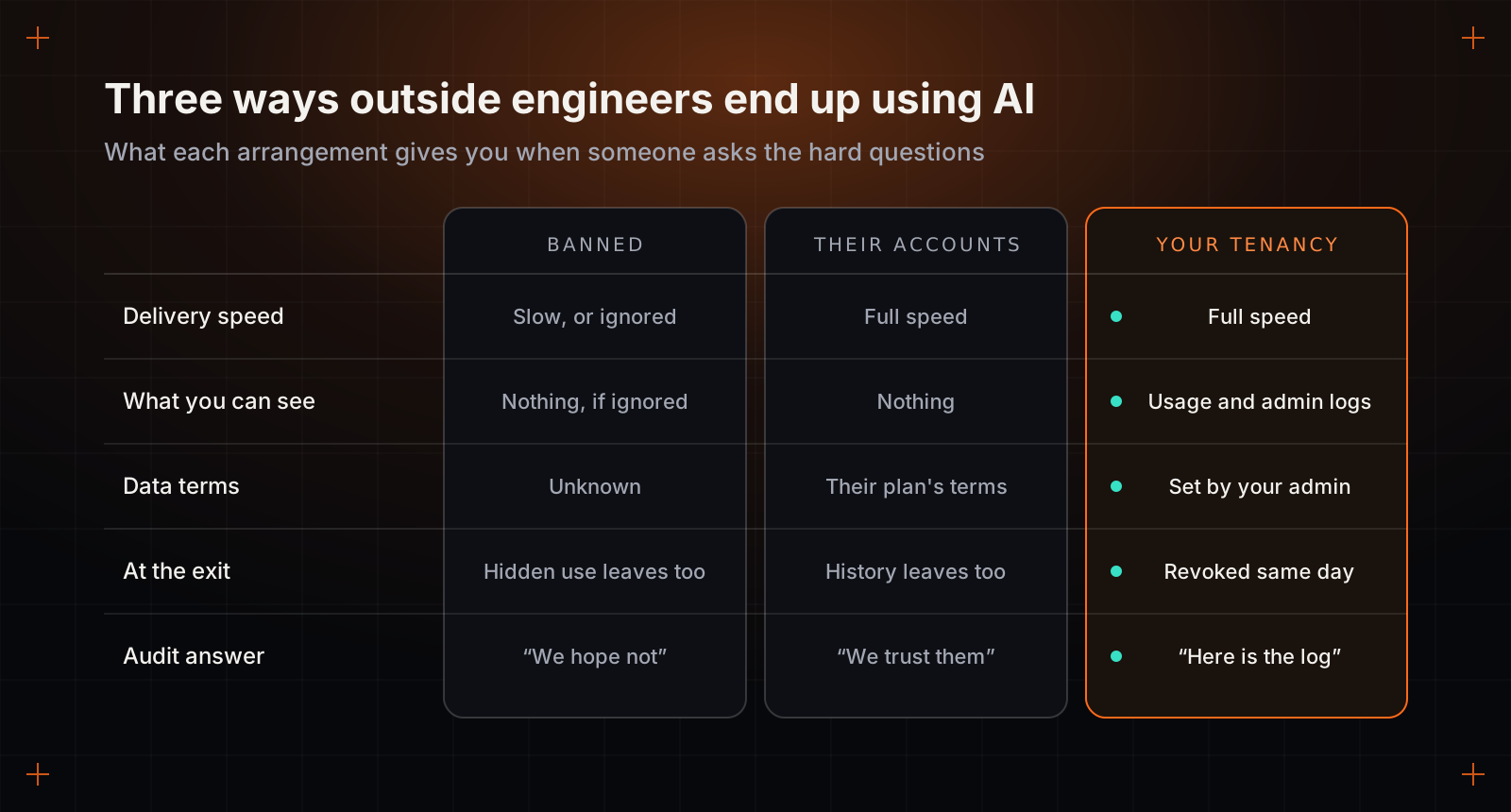
The instinct after a scare is to write "no AI tools on our code" into the statement of work. It feels safe. In practice one of two things happens. Either the engineers comply, and you are paying senior rates for people working without tools that have become part of how senior engineers work, or they comply in name and keep using the tools where you cannot see. In our experience the second happens more often than anyone admits at the kickoff meeting. It leaves you worse off than before the ban, because undeclared use has no settings, no logs and nobody accountable for it.
There is a legitimate version of the ban. Some code really should not leave your network: defence work, certain regulated systems, a codebase whose entire value is one algorithm. If that is you, say so before you sign, budget for slower delivery or for models that run inside your own infrastructure, and pick a vendor who tells you plainly what that costs. A vendor who promises full speed and no AI at all is telling you something untrue about one of the two.
"Use whatever you like" sends the bill later
The opposite reaction is to shrug. Everyone uses these tools, the engineers are professionals, why make it complicated. The engineers' judgement is rarely the problem. Where the material ends up is.
Personal and business plans from the same AI provider can carry quite different data terms, particularly on how long conversations are kept and whether they may be used to improve the provider's models. An engineer on a personal plan has accepted those terms on your behalf without either of you noticing. Their conversation history, which after a few months amounts to a fair description of your architecture and its weak spots, lives in their account. When the engagement ends you can remove them from the repository in a minute. You cannot remove that.
Then comes the question an auditor or an enterprise customer will eventually put to you: which AI services have processed our code, and under what terms? "We trust our contractors" is an honest answer and a poor one.
The rule: your tenancy, their skill
The fix is less dramatic than either reaction. Treat AI tools the way you already treat the repository, the ticket tracker and the cloud console: you provision them, on your accounts, and the engineer brings the skill to use them well. A tenancy, here, simply means your organisation's own workspace with a provider, with its own administrator, settings and logs.
In practice that means buying business seats for the tools you approve, attaching them to your single sign-on so access follows the same joiner and leaver process as everything else, and setting retention and training options once, centrally, instead of hoping each engineer found the right toggle. Your administrator can see who is using what. When someone leaves, their AI access goes in the same step as their access to the code, and the history stays with you.
A seat costs very little next to a day of a senior engineer's time, so this is rarely a budget conversation. The real objection tends to come from the vendor: their engineers have enterprise accounts of their own and workflows they are fluent in. That can be acceptable if the vendor shows you the plan and the settings in writing and commits to revoking access on your timetable. It is still second best, because at the exit you are relying on their process instead of running your own.
Six decisions to make before day one
None of these takes long. All of them get much harder once the engineers have started and habits have set.
- Which tools, by name and plan. A line saying assistants are permitted leaves room for a personal account to count as compliant. Name the products and the tier.
- Whose accounts. Yours by default, the vendor's by written exception, the individual engineer's never.
- What may be shared. Source code and synthetic test data, yes. Customer records, unscrubbed production logs, keys and passwords, no. Engineers follow a written list of categories far more reliably than a general appeal to be careful.
- What an agent may run. Coding agents now run commands, install packages and edit files on their own. Decide where they are allowed to do that. The next section is about exactly this.
- How the code is reviewed. AI-written code gets the same review as any other, and whoever submits it must be able to explain every line. Skip the rule that tool-written lines be labelled: within a month the labels are everywhere and mean nothing.
- What happens at the exit. AI seats are revoked with repository access, and the history stays in your tenancy. The contract should also assign you whatever rights exist in AI-assisted output, since the law on machine-written code is still unsettled in several countries.
Agents changed the access question
Until recently this was mostly about what an engineer pasted into a chat window. Agentic tools moved the risk. An agent working on an engineer's machine can read any file the engineer can read and run any command the engineer can run. If that machine holds a production database password in a configuration file, so does the agent. If the agent reads a malicious instruction planted in a dependency's documentation or in the text of a support ticket, an attack called prompt injection, it may act on it with every permission the engineer has.
This bites harder with embedded engineers than with your own staff, for a dull reason. Outside engineers are often given broad access in the first week so that nothing blocks them, and that access is rarely trimmed afterwards. Put an agent in that environment and the generous access becomes the agent's access too.
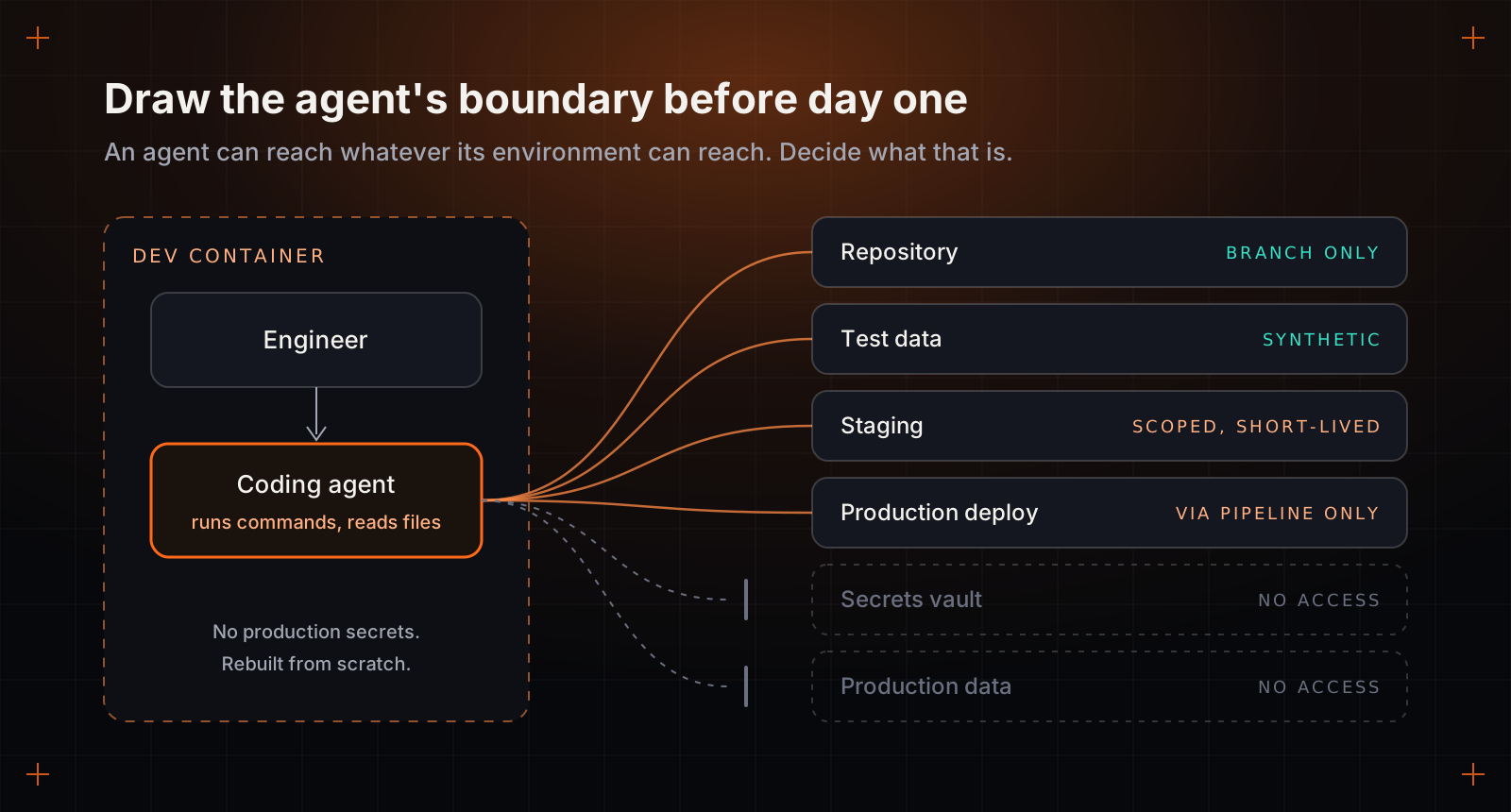
The answer is ordinary engineering hygiene, applied on purpose. Give engineers a development environment, ideally a container that can be rebuilt from scratch, with no production secrets in it at all. Use synthetic or masked data. Where staging access is needed, issue credentials that are scoped to the task and expire quickly. Let changes reach production only through your pipeline and its reviews, so nothing an agent does locally can skip them. With the boundary in the right place, a confused agent produces a bad pull request, which review catches. With it in the wrong place, the same confusion produces an incident.
The question to put to any vendor
Whoever you hire, ask them to describe how their engineers' AI use would show up in your audit trail. Then listen for specifics.
A good answer names the tools and plans, accepts working on your accounts or explains precisely why not, and comes with a written position on secrets, data and agent permissions that you can read before the contract is signed. It also admits the trade-offs: what slows down if you restrict a tool, and what the engineers need from you to work safely.
Two answers should worry you. "Our engineers do not use AI" is either untrue or a description of a team that will be slower than you expect. "It is all covered, we have an enterprise licence", with nothing behind it, means nobody has thought about where your code goes after the laptop closes.
The tools will be part of the work whatever the contract says. What is left for you to decide is whether they come in through your front door, under your name, where you can see them and switch them off.
The short film: transcript
Outside engineers use AI. Put it on your accounts.: the short version (1:18)
Most engagement contracts never mention AI. Meanwhile the engineers you've brought in are already using it, and your code goes wherever their tools go.
By the second week, a stack trace, a schema and a few config files have passed through services whose terms you've never read. When the engineer leaves, that history leaves with them.
There's a fair case for a ban when the code is defence work, a regulated system, or one algorithm the whole company rests on. Say so before signing, and budget for slower delivery or models you host yourself.
Provision AI tools exactly the way you already provision the repository. A business seat costs little next to a day of senior time, and the history stays with your company.
Agents read files and run commands with the engineer's own permissions. Give them a rebuildable container and short-lived credentials, so a confused agent makes a bad pull request, not an incident.
Ask any vendor how their engineers' AI use would show up in your audit log. A specific answer tells you more than any sales deck.
Read the full article at Precision Code Studios.