Engineering · · 8 min read
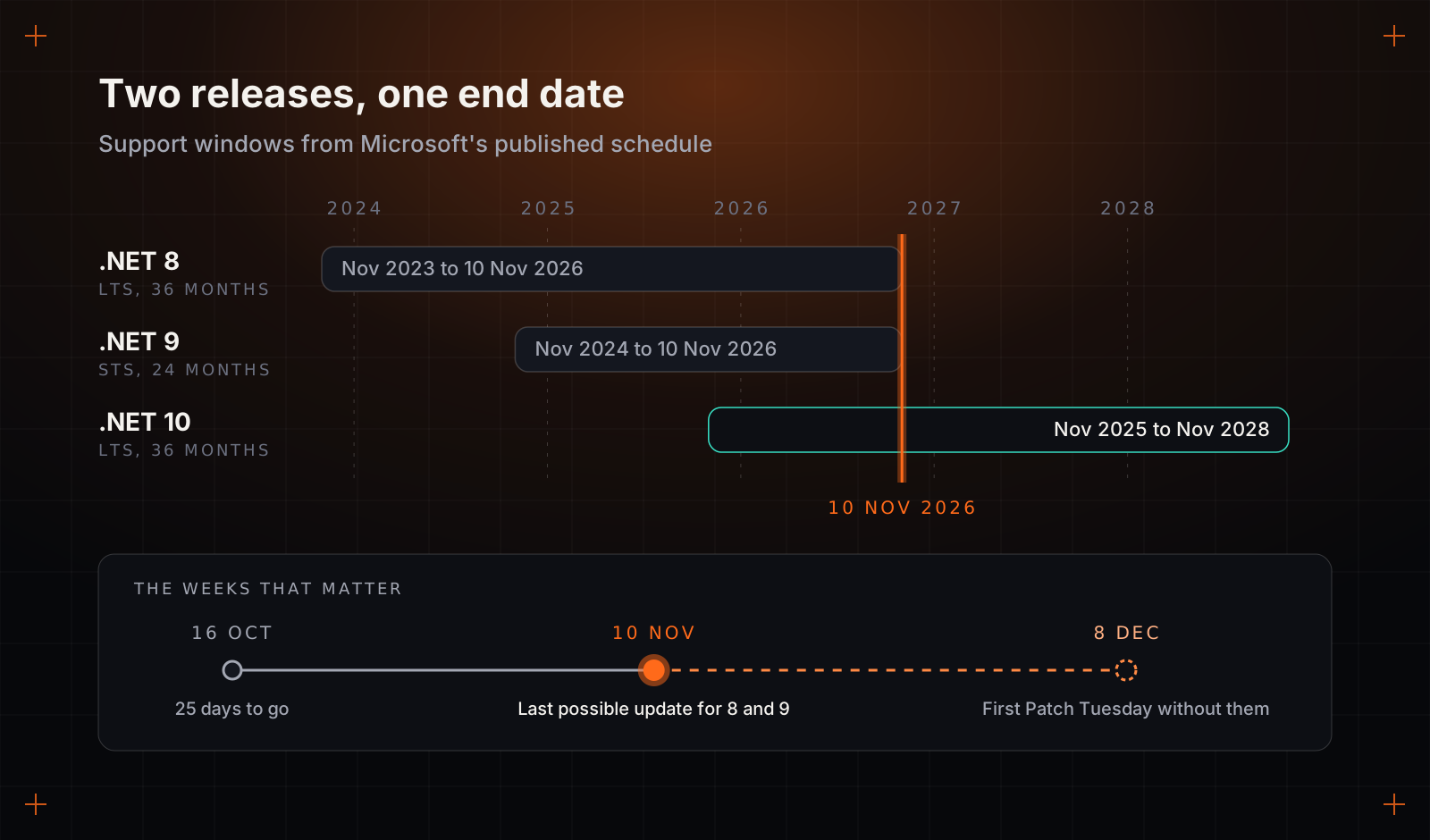
.NET 8 goes out of support on 10 November. Nothing will break that day.
On 10 November, .NET 8 and .NET 9 stop getting security fixes. Your applications will keep running, which is exactly why the date gets missed. How to triage what you run, and what to tell the next security review.
By Precision Code Studios, Engineering team
On Tuesday 10 November, Microsoft will ship what may be the last update for .NET 8 and .NET 9. On Wednesday morning, every application built on them will start, answer requests and pass its health checks exactly as it did the day before. No alert fires. No customer notices. The upgrade ticket that has been sitting in the backlog since spring will look, if anything, slightly less urgent than it did.
That quiet is the problem. .NET 8 is the long-term support release a great deal of business software on the Microsoft stack moved to over the past three years, and teams that went one step further to .NET 9 are in the same position: Microsoft gave its short-term releases 24 months of support, which puts the end of .NET 9 on the very same day. According to Microsoft's .NET blog, after 10 November neither version receives security fixes, servicing updates or technical support. The recommended destination is .NET 10, a long-term support release covered until November 2028.
With a little over three weeks left, upgrading everything in time is unlikely for most companies running more than a handful of applications. Choosing what moves first, and being able to explain the rest to a customer who asks, is still entirely possible.
What actually changes on 11 November
Two things, and neither shows up on a dashboard.
The first is technical. The .NET runtime and ASP.NET Core, the web framework most .NET applications sit on, receive security fixes as a normal part of monthly servicing, released on Patch Tuesday, the second Tuesday of the month. The first one after the deadline is 8 December. If that release fixes a flaw in request handling or authentication, .NET 10 gets the fix, .NET 8 does not, and the advisory describing the flaw is public. From then on, each month widens the gap between what an attacker can read about and what you can patch.
The second is on paper, and for many companies it bites first. Customer security questionnaires, penetration test scopes and investor due diligence all ask some version of one question: is anything in production running on software its vendor no longer supports? Until 10 November the honest answer for a .NET 8 shop is no. From the 11th it is yes. In a penetration test report, an unsupported framework is usually written up as a finding in its own right, before anyone has shown an exploit, and an enterprise buyer's security team will want to know what you are doing about it before procurement moves.
Why the upgrade ticket keeps losing
Ask a developer what the upgrade involves and you will often hear: change net8.0 to net10.0 in the project files, rebuild, clear a few warnings. For a small, well-tested service that is close to true, and it is exactly why the work never gets protected time. It sounds like an afternoon, so it is scheduled like one, and then it loses every sprint planning to something a customer asked for.
The version number is the cheap part. When an upgrade runs to weeks, the time nearly always goes into one of these.
- Packages that did not move. A library whose maintainer stopped at .NET 8, a vendor SDK with no newer build, a version pinned two years ago for a reason nobody wrote down. Each is a small investigation that ends in upgrade, replace or fork.
- The build and hosting around the code. SDK versions pinned in global.json, build agents with only the old SDK installed, Docker base images tagged 8.0 across a dozen repositories, hosting settings still on the old stack. None of it is hard. All of it lives in different places and belongs to different people.
- Azure Functions on the in-process model. The older in-process model stops at .NET 8. Moving those functions to the isolated worker model changes startup, bindings, dependency injection and logging. That is a port, and it should be estimated as one.
- Behaviour that changes without a compile error. Microsoft publishes a breaking-change list for every release. Most entries are harmless. A few alter behaviour at runtime, in serialisation, authentication or query translation, and the code builds cleanly before failing on one customer's unusual data.
- The tests you do not have. If an application has thin automated tests, the real cost of the upgrade is building enough confidence to ship it. That cost was always there. The deadline only sends the bill.
AI coding tools have made the mechanical part cheaper. Updating package references, renaming APIs and rewriting a function's startup code are tasks they handle well with an engineer reviewing the result. That pushes even more of the cost into the last two items, which is where experience earns its keep: working out what could have changed, and proving that it did not.
Three weeks: triage, do not boil the estate
Trying to move everything by 10 November usually produces a rushed upgrade of everything and a careful upgrade of nothing. Rank the applications instead, with three questions for each.
- Can untrusted people reach it? Anything on the public internet, or receiving webhooks or uploaded files from outside, meets the next published vulnerability first.
- Does it hold or move something valuable? Customer data, payments, credentials, or a path to the systems that hold them.
- Is someone about to examine it? A customer's security review, a certification audit, a pen test booked for the new year, or a funding round or acquisition with technical due diligence attached.
An application that faces the internet and answers yes to either of the other questions moves now. One that is internal but sits inside an audit scope gets a firm date before the year ends. Everything else gets a planned slot in the first quarter. Anything nobody can name an owner for becomes a candidate to switch off, which is the cheapest upgrade there is.
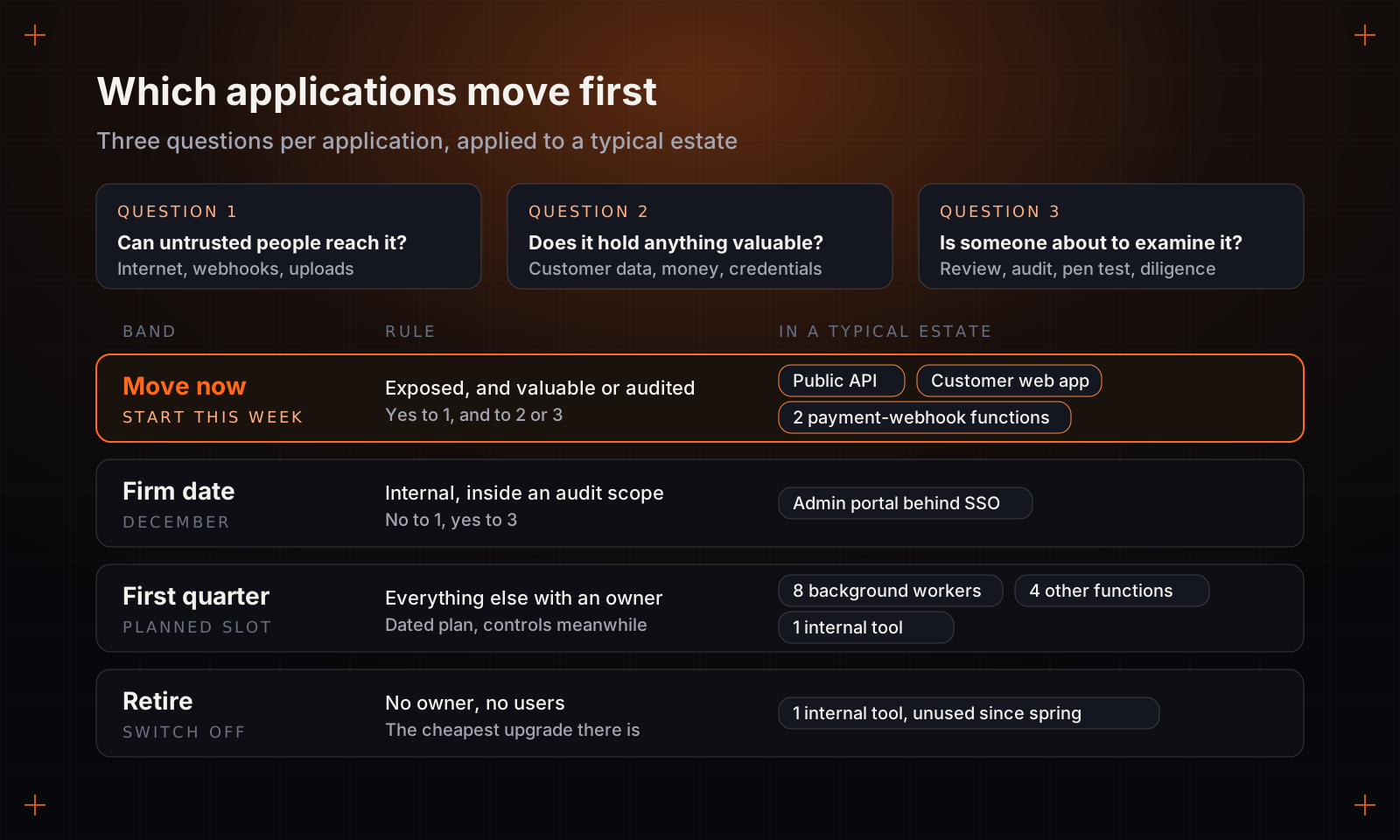
Take a typical estate for a mid-sized software company: a public API, a customer web app, an admin portal behind single sign-on, eight background workers, six Azure Functions on the in-process model and two internal tools. The API and the web app go first, and they are often the easiest because they are the best tested. Two of the functions receive payment webhooks from outside, which makes them both exposed and valuable, so they start now even though the port means they will finish after the deadline. The admin portal is internal but inside the scope of a customer's annual review, so it gets a December date. The workers and the other four functions get first-quarter slots. One internal tool turns out to have had no users since the spring, and is retired instead of upgraded.
For whatever stays on .NET 8 past the deadline, shrink what the next vulnerability can reach. Restrict network access to what the application genuinely needs, keep firewall rules in front of it current, and give someone the job of reading each month's .NET security advisories, so you know the day a fix you cannot receive is published. Some companies sell commercial patches for .NET versions after Microsoft stops. If you consider one, treat it as a bridge with an end date, and ask exactly which fixes they backport and how quickly.
What to tell the next security review
Security reviewers are not shocked by old software. Nearly every company has some. What they are judging is whether you know where it is and whether anyone is in charge of it.
So write the answer before you are asked. One page is enough: every application, its version, its band, the date it moves, the person accountable and the controls in place until then. A reviewer who sees a known gap with a schedule can usually log it as a tracked risk and let procurement carry on. "We are looking into it" tends to become a follow-up call, then a request for evidence, then a deal that slips a quarter.
Who should do the work
If your team has slack, the applications have decent tests and the in-process functions are few, do it yourselves. It is well-understood work, Microsoft's migration guidance is good, and it is an excellent way for a newer engineer to learn the estate. You do not need an outside team for that.
Outside help earns its place when the feature roadmap cannot pause, when the person who understood the build pipeline has left, or when the inventory turns up more ports and dependency archaeology than the team can absorb without missing commitments. A runtime upgrade is also one of the cleanest pieces of work to hand to a managed team, because done is unambiguous: every application on .NET 10, in production, with no unsupported packages and the tests green. Whoever does it, your own engineers or a vendor, put four questions to them before the work starts.
- Will you inventory before you estimate? Any figure given before someone has listed the packages, pipelines and hosting settings is a guess with a number on it.
- How will you show that nothing changed? Look for a way to compare behaviour before and after, such as recorded requests replayed against both versions, not just a passing build.
- What happens to packages with no supported version? The answer should be a decision per package, made with you, not a quiet pin to the old version.
- Where does done happen? In production, with monitoring watched for a while afterwards. A merged pull request is not an upgraded system.
The date for the next one is already published. .NET 10 support ends in November 2028, so the ticket for that upgrade can be written this quarter, with a date and an owner, while the people who did this one still remember what it cost. The cheapest runtime upgrade is the one that was on the roadmap before anybody asked about it.
The short film: transcript
.NET 8 support ends 10 November. Your apps won't notice.: the short version (1:14)
The support calendar for dot net is published years in advance. Even so, this date tends to surface in a customer's security questionnaire rather than a planning meeting.
Dot net nine catches people out. It's the newer release, but its support was set at two years, so it runs out on exactly the same Tuesday as eight.
On the eleventh nothing happens. No outage, no alert. The cost arrives the next time Microsoft ships a security fix, possibly as soon as the eighth of December, and your version isn't on the list.
Changing the target framework takes minutes. The weeks go on the library whose maintainer moved on, the build agent stuck on the old toolkit, and Azure Functions written for a model with no dot net ten version.
Ask whether each app faces the internet, whether it touches customer data or money, and whether someone's about to audit it. Anything left over gets a slot next quarter, and anything without an owner is a candidate to switch off.
Reviewers can work with a known gap and a schedule. What stalls a deal is a team that hasn't looked yet.
Read the full article at Precision Code Studios.