Cloud · · 6 min read
Stop babysitting servers: the case for container apps.
Every server you run is a small job you never applied for. Managed container platforms take most of that job away. Here is what you gain, what you give up, and how to move.
By Precision Code Studios, Engineering team
Ask a small engineering team what they did last month and the honest answer often includes work no customer will ever notice: patching an operating system, renewing a certificate, resizing a disk at midnight, working out why one server behaves differently from its twin. None of it is the product. All of it is urgent.
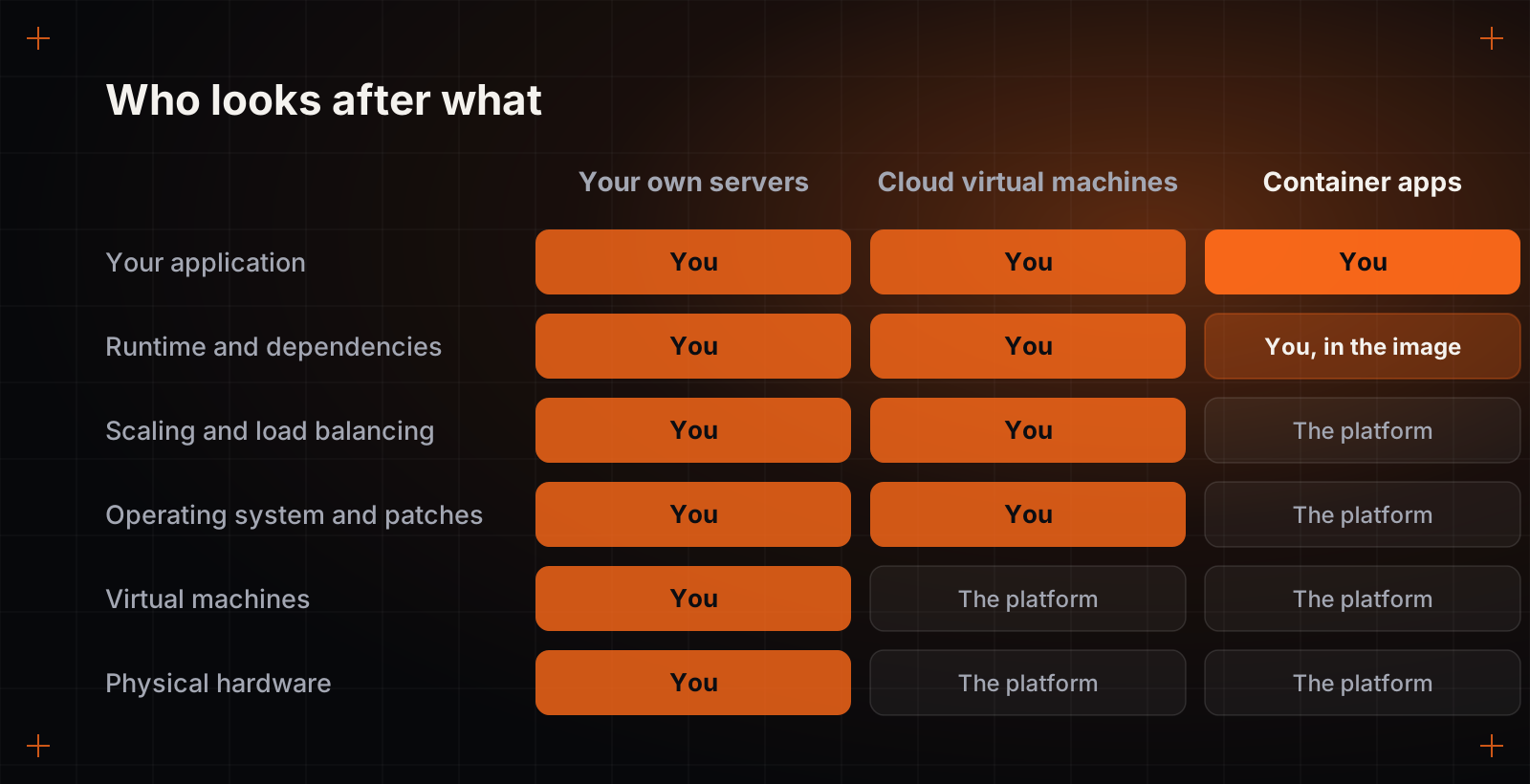
Managed container platforms exist to hand that work to someone else. You package your application as a container, give it to the platform, and the platform runs it, restarts it when it fails, routes traffic to it and adds or removes copies as demand changes. Azure Container Apps, Google Cloud Run and AWS App Runner are the best-known examples.
What you gain
- No operating system to patch. The platform maintains the machines underneath. Your responsibility ends at the container image.
- Scale that follows demand. Copies are added under load and removed afterwards, and many platforms can scale an idle service down to zero.
- Safer releases. Each deployment is a new revision. You can send it a small share of traffic, watch it, and roll back in seconds.
- One artifact everywhere. The image a developer runs on a laptop is the image that runs in production, which ends a whole category of surprises.
- The plumbing is included. Secure connections, load balancing, secrets and logs come with the platform instead of being a project of their own.
- You pay for use. Billing follows what the application consumes rather than the size of the machines you guessed you might need.
The honest trade-offs
Nothing in engineering is free, and container platforms are no exception. A service scaled to zero takes a moment to wake up for its first request. You have less control over the network and the kernel than on a machine you own. Databases and other software that keeps state belong in a managed database service, not in the container. And for a workload that runs flat out all day, every day, reserved virtual machines can still come out cheaper.
What about Kubernetes?
Kubernetes is the engine most of these platforms are built on, and for large organisations with a dedicated platform team it is the right tool. But running it well is a product in its own right: upgrades, networking, security policy, capacity. Container apps give most teams the parts of Kubernetes they wanted, the scheduling, scaling and self-healing, without asking them to operate the engine.
A sensible way to move
- Start with one stateless service. An API or a web front end is ideal. Leave the database where it is for now.
- Move configuration out of the code. Settings and secrets should arrive from the environment, so the same image runs anywhere.
- Add health checks and write logs to standard output. The platform uses both to keep the service alive and observable.
- Put data on managed services. A managed database and managed storage remove the last reasons to keep a server.
- Then tune the scaling rules. Measure real traffic first. Guessing is how bills grow.
The goal is not containers for their own sake. It is an engineering team whose hours go into the product. For most applications, the best server is the one nobody on the team ever has to think about.